CoreMVP for Next.js

Changelog

Features, fixes, and what to know before you update. Dates follow source changes; use the current documentation for setup.

Private files and profile pictures

Owner-restricted uploads and explicit profile-picture saving.

Upload, read, and delete private PDF, PNG, and JPEG files up to 4 MiB. Account supports picture previews, replacement, removal, Save, and Reset; confirmed pictures also appear in the account menu.

Upgrade: apply the new Supabase Storage migration before using the file APIs. Profile pictures support PNG and JPEG. Incompatible existing bucket settings stop the migration without changing stored objects. Hosted upload limits and picture caching still need deployment-specific verification.
Storage setup and usage.

Stripe catalogs for each environment

Configure your own Product and Price IDs for test and live billing.

Pricing cards and Checkout now use the same environment-configured Stripe Product and Price IDs. Test mode is the default; missing test prices keep Checkout unavailable while the rest of the app can start. A guide for coding agents is available at /docs/llm.txt.

Upgrade: configure live mode and every retained plan's catalog IDs before upgrading a live deployment. Public pricing configuration requires a rebuild.

Billing configuration.

Updated

A refreshed landing page and dashboard

A shared product preview, compact navigation, and consistent application surfaces.

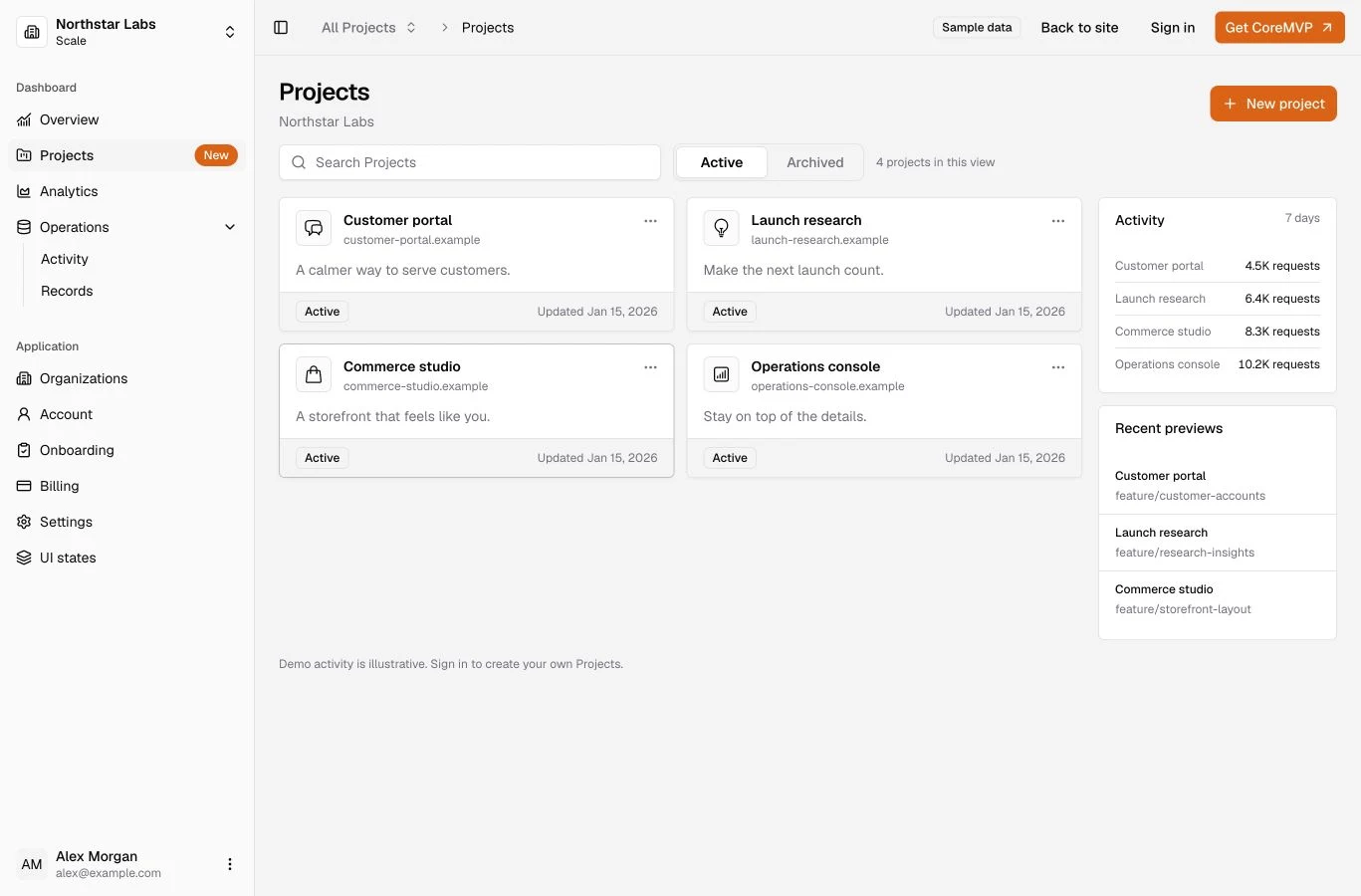
The landing page now presents the application through an interactive Projects preview, product navigation, and an expanded feature grid. Blog, Docs, auth, pricing, and dashboard layouts share the updated design.

Landing page with the interactive Projects preview inside the application shell
The landing page opens with an interactive Projects preview using sample data.

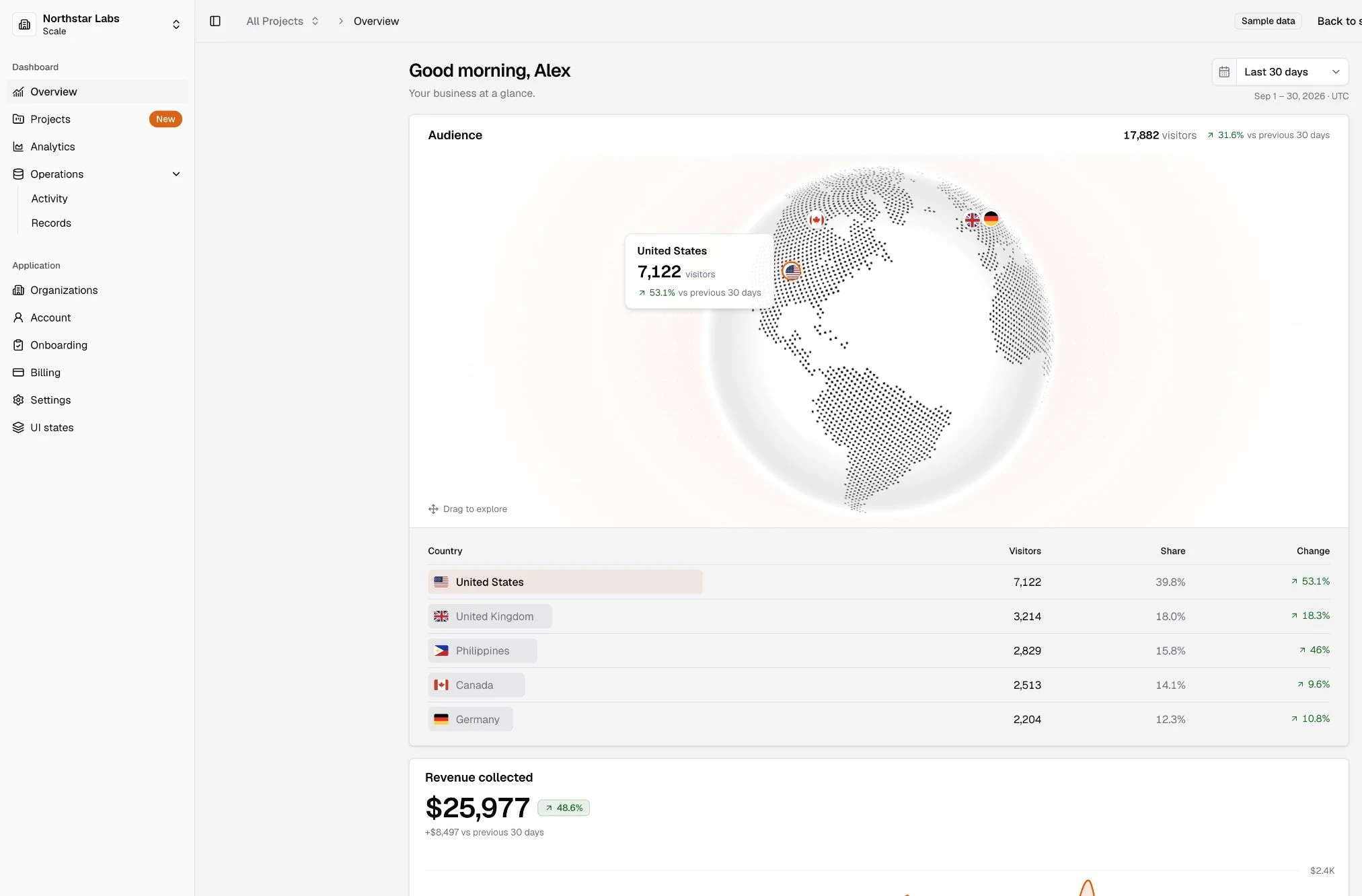
Overview includes an interactive Audience globe with a readable fallback when WebGL is unavailable. Sample reports stay labelled as illustrative, and public demo mutations stay disabled.

Dashboard Overview with the Audience globe, country breakdown, and sample revenue reporting
The Overview includes an Audience globe and country breakdown, followed by sample revenue reporting.

Reporting date labels render consistently between server and browser. Local and hosted Auth and billing checks share helpers and follow the current password-setup route.

Explore the dashboard.

Updated

Projects inside Organizations

Create, rename, archive, and restore Organization-owned Projects.

Every signed-in user starts with a private Personal Organization. Shared Organizations contain their own Projects: owners and admins can create, rename, archive, and restore them; members can view them. Project lists, selection, and pagination stay scoped to the selected Organization.

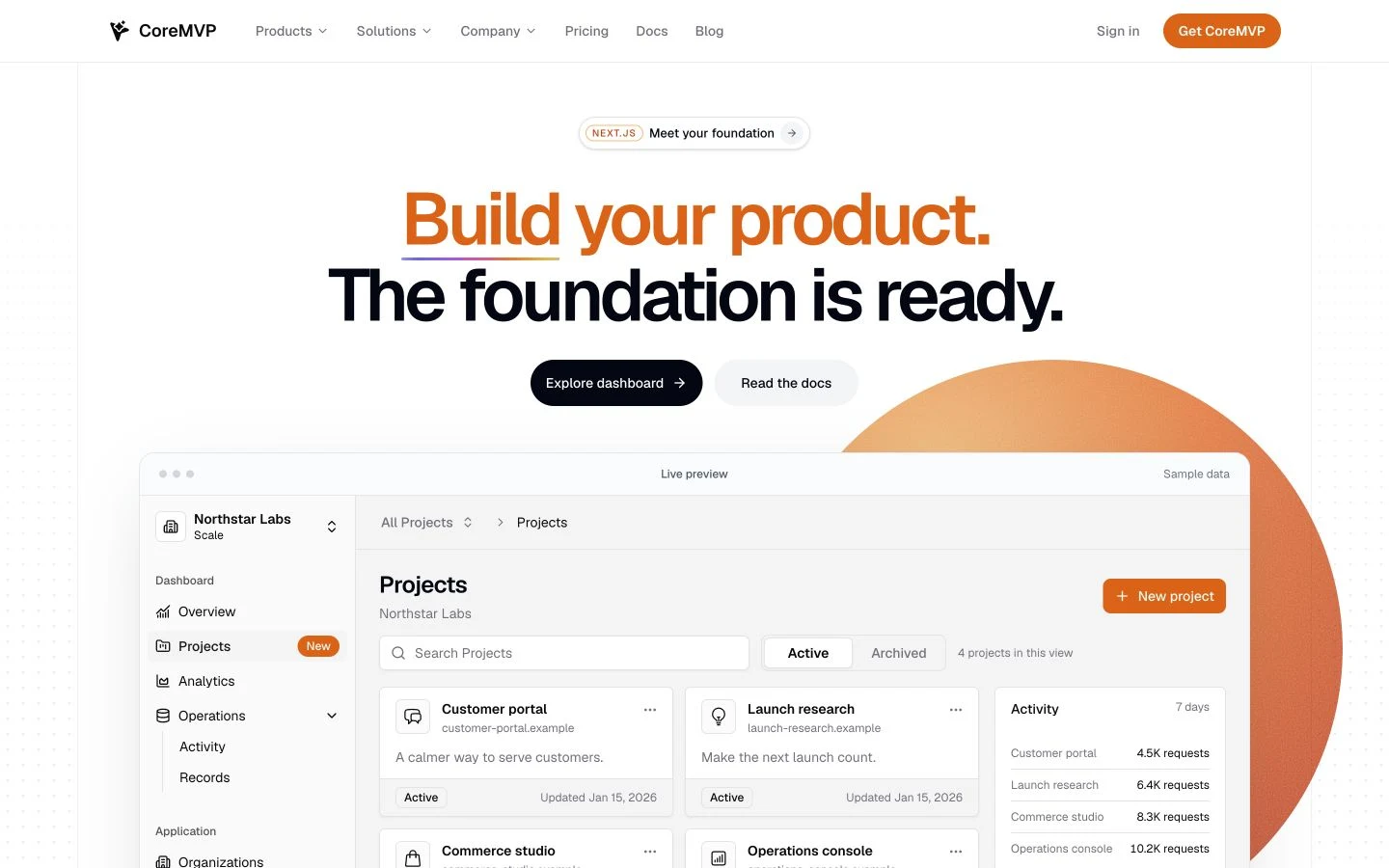
Projects inside Northstar Labs with Organization selection, search, Active and Archived views, and sample project cards

The public Projects preview with Organization selection, search, and Active and Archived views. Project details and activity are sample data.

Upgrade: apply the Organization and Projects migrations. Supported earlier Organization data is retained; a conflicting custom public.projects table stops installation rather than being overwritten.

Organization models, repositories, services, and routes now use the standard application directories. Update extension imports that used the previous Organization module locations.

Explore Projects.

Consistent API request validation

Malformed requests stop before service or provider work begins.

Normal API endpoints now share typed Zod validation. Malformed JSON, missing fields, incorrect types, and invalid identifiers return a safe 400 response before downstream work. Stripe webhook verification continues to use the original raw body.

The API guide includes one copyable endpoint recipe. The obsolete database verification command was removed.

API route reference.

OAuth callbacks and password recovery

Request-bound callbacks establish sessions before opening Dashboard.

Supabase PKCE callbacks establish the cookie session before Dashboard opens. New password-recovery links use /auth/reset-password, with compatibility for earlier fragment links. New and changed passwords require at least eight characters. Google remains in the default forms; GitHub is optional and disabled there by default.

Upgrade: follow the current Authentication guide for provider callbacks, application redirects, and the hosted password minimum.

Authentication setup.

Supabase publishable and secret keys

The application uses the current public and server-only key names.

Supabase configuration now uses NEXT_PUBLIC_SUPABASE_PUBLISHABLE_KEY and server-only SUPABASE_SECRET_KEY. The client, SSR integration, CLI, and Node requirements were updated together.

Upgrade: rename the earlier environment variables in every local and hosted consumer; there is no legacy-name fallback. Keep both provider key generations active until your consumers have migrated. Use Node.js 22 or later.

Configuration reference.

Updated

A dashboard you can actually build on

A real application shell with account, billing, product pages, and role-aware organization states ready to extend.

Your dashboard should be something you build on, not something you delete before the real work starts.

We rebuilt the template dashboard around one shared application shell. The public preview and authenticated dashboard now use the same navigation, page geometry, and product surfaces, while authenticated pages read the real account, billing, and organization state that the template owns.

The shell includes Overview, Analytics, Activity, Records, Account, Billing, Settings, Onboarding, Organizations, and reusable loading, empty, unavailable, and error states. Sample charts and revenue data stay clearly labelled as sample data so you can connect them to your own product without mistaking them for persisted application state.

Current CoreMVP for Next.js Overview showing Projects navigation, an Audience globe, and sample revenue reporting

Current dashboard Overview with an Audience globe and revenue reporting; account and access status follows below.

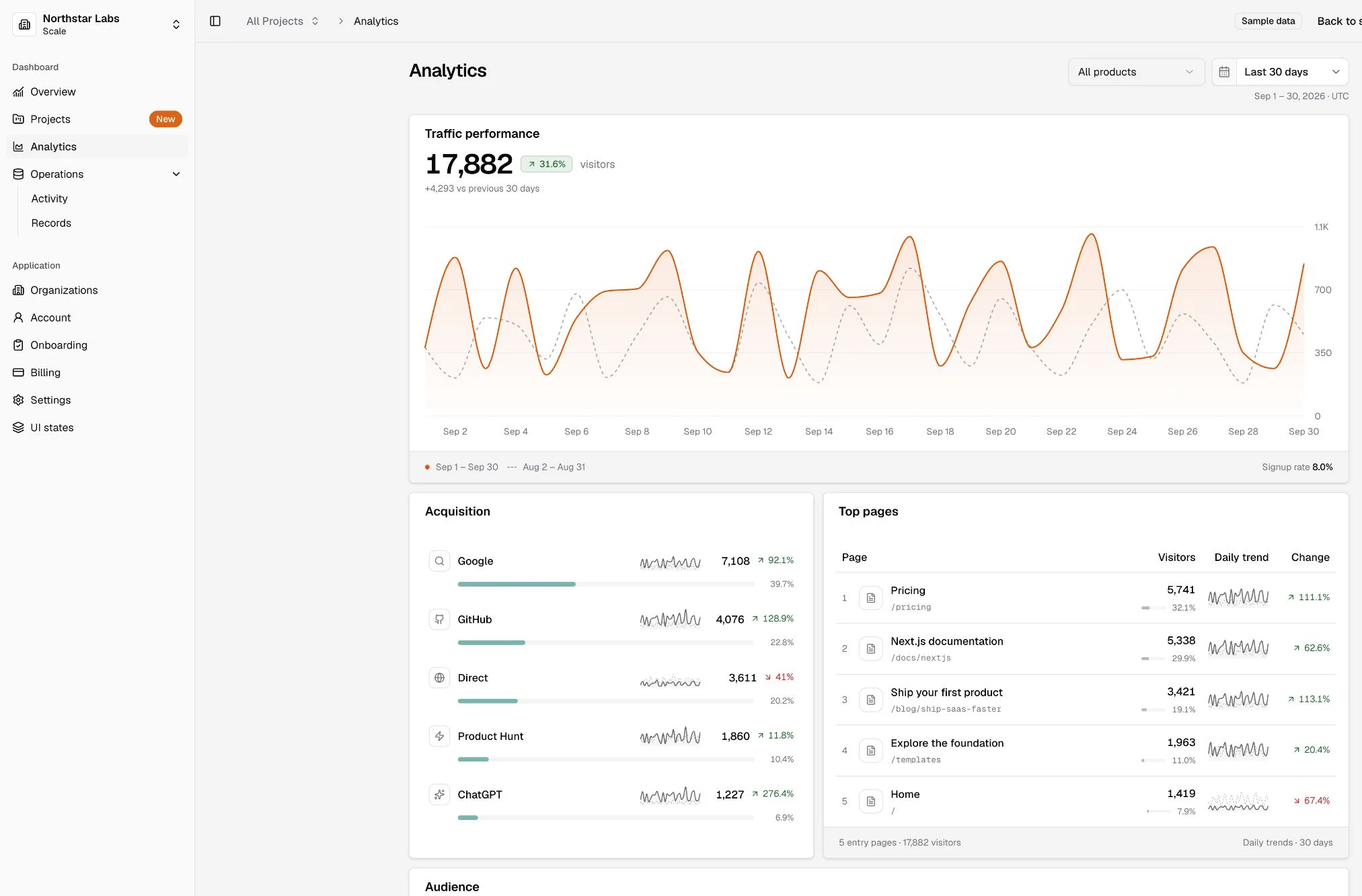
Current CoreMVP for Next.js Analytics showing traffic performance, acquisition, top pages, and audience breakdowns

Current Analytics view with traffic, acquisition, top pages, and audience data clearly labelled as sample data.

You can explore the current shell in the dashboard demo.

Updated

Organizations and team workspaces

Shared Organizations with roles, invitations, membership changes, and server-enforced authorization.

The August release established shared Organizations so products could add team workspaces without designing membership and authorization from scratch.

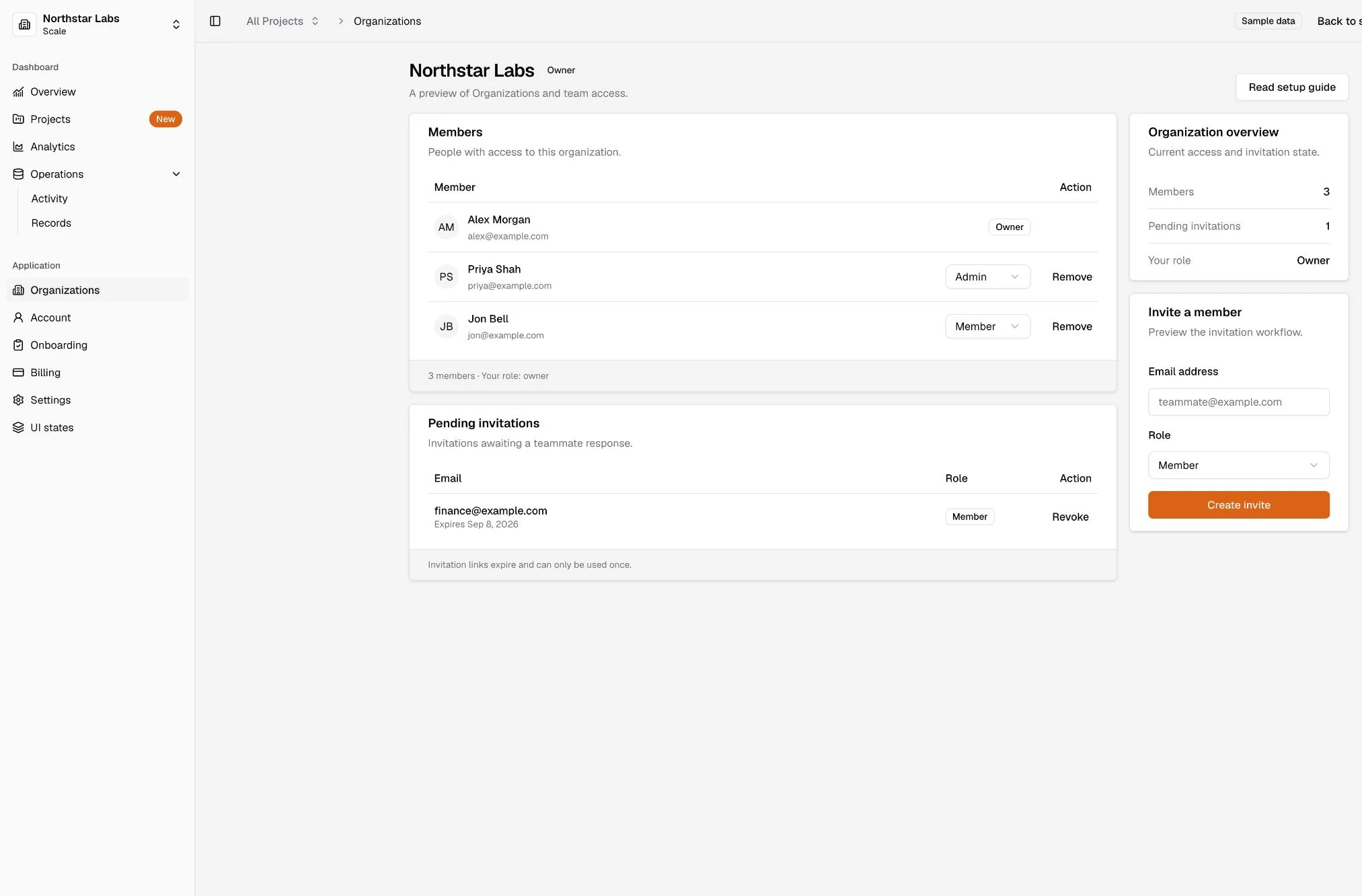
The capability includes one canonical owner plus admin and member roles, invitations with expiry and revocation, role changes, member removal, and server-enforced authorization on every Organization request.

Current CoreMVP for Next.js Organizations view showing members, roles, pending invitations, and invitation controls

Current Organizations view with membership, roles, pending invitations, and invitation controls inside the shared dashboard shell.

The current dashboard presents that capability inside the shared application shell shown above.

Simpler setup with Supabase and Vercel

Provider-owned setup stays in Supabase, Vercel, and Stripe while CoreMVP keeps the checks that prove your app is wired correctly.

Setup is easier to reason about when each tool owns the state it actually controls.

Supabase, Vercel, and Stripe now stay responsible for their own accounts, projects, environment values, and deployment actions. CoreMVP keeps the application-owned verification commands that tell you whether the template is connected correctly.

Supabase Your Next.js app Stripe Vercel CoreMVP verification

Later command refinements made the local-versus-production boundary clearer, but they do not change this release date: the provider-native setup direction shipped here.

Agent-readable Docs

Source-backed Markdown and llms.txt make the included documentation easier for people and coding tools to consume.

The same documentation should work for a person in the browser and for the coding tools helping them build.

Public template Docs can now be consumed as source-backed Markdown, with a curated llms.txt discovery map alongside the rendered experience. The machine-readable routes derive from the same content source instead of creating a second copy of the documentation.

One Docs source Rendered HTML Markdown llms.txt

Access boundaries still apply where content is gated. This release is about documentation interoperability; it does not include an AI chat or RAG application.

Hono powers your API layer

One embedded Hono boundary now owns /api/* inside the same Next.js application.

Your backend has one clear place to grow.

Inside the same Next.js application, embedded Hono owns the canonical /api/* surface. Routes handle HTTP input, services own business behavior, and repositories or providers own persistence and external systems. Browser-facing API URLs stay the same.

Browser Next.js Hono /api/* Service Repository / Provider

This is the structure you extend when you add product APIs, Stripe behavior, database logic, or integrations without splitting the app into a second deployment.

A better starting point for your public site

The template now includes a polished Blog, pricing surfaces, footer, and the SEO foundations those pages need.

A working product still needs a public surface before you can launch it.

The template now includes a Fumadocs-backed Blog, article navigation and sharing, redesigned lifetime and subscription pricing experiences for the products you build, and a shared public footer. The same shipping tree also added the metadata, sitemap, robots, and social-preview foundations those pages need.

That gives you a stronger place to start your marketing site without turning the template into a fixed brand. The content and pricing configuration remain yours to replace with the product you are actually building.

Auth and billing, wired together

Supabase Auth, Stripe Checkout, signed webhooks, persisted access state, and protected content now work as one application flow.

Auth and billing are useful when they agree on one durable answer to a simple question: should this user have access?

The template connects Supabase Auth with lifetime and subscription Stripe Checkout, signed Stripe webhooks, persisted billing and access state, and protected content. The local proof path exercises the same customer-facing flow instead of treating a successful Checkout redirect as access truth.

Auth / Checkout Stripe Signed webhook Persisted access state Dashboard + protected access

The core flow is wired together. Hosted checks have since proved auth, lifetime billing, and subscription billing against the deployed demo. Guest lifetime onboarding concurrency and recovery resilience, plus a selectable billing-schema footprint, remain separate follow-up work rather than something this release claims is already complete.

Drizzle for the data your app owns

Supabase keeps authentication while application data moves through Drizzle and Postgres.

Authentication and application data do not need to share the same access layer.

Supabase continues to own authentication and session identity. The data your product owns now goes through Drizzle over Postgres, giving you a clear place to define models, repositories, queries, and migrations as your application grows.

Supabase Auth Identity Your app Drizzle Postgres app data

That separation keeps the template easy to extend: use Supabase for identity, then treat your own application data as an explicit database layer instead of routing every product query through the Auth client.

Meet CoreMVP for Next.js

The initial Next.js release brought together the public site, pricing, billing, dashboard, Docs, and application foundation.

CoreMVP for Next.js started as one application with the hard surrounding pieces already assembled.

The initial release brought together a public landing surface, pricing and subscription billing foundations, a dashboard, protected documentation, and the application structure customers could clone and extend.

Later releases changed important parts of that foundation, but this is where the current Next.js product history begins.